

Feed.fm Android music SDK
Android music SDK overview
The Feed.fm Android music SDK adds Feed Radio's pre-cleared music and player controls to your Android app. It's available on Maven Central and built on Android's Media3 player.
What's included
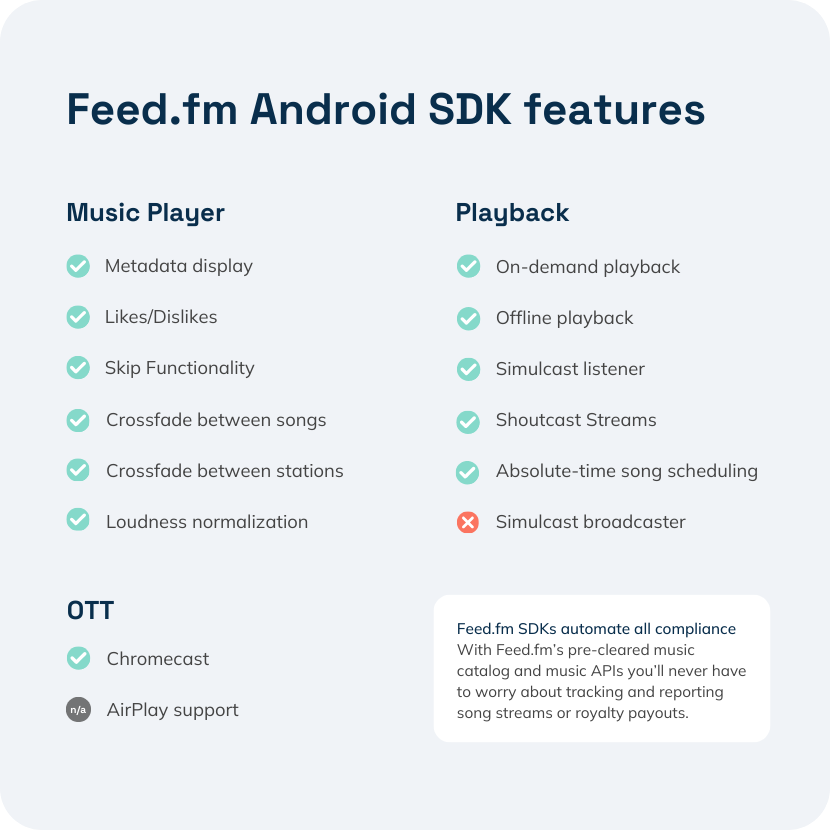
The SDK gives your app a shared player with station lists, likes, crossfades between tracks, and listeners for playback state and errors. Android notifications let listeners control playback from the lock screen.
Feed.fm also provides a working sample music player that supports streaming, on-demand, simulcast, and offline stations.
Getting started with the Android music SDK
Test credentials
The SDK's FeedAudioPlayer needs a token and secret from the Feed Radio API. They let the player connect to the Feed.fm server, confirm the listener is in a licensed region, and load the stations available to your app.
To start testing now, use these sample credentials with the public Android SDK on GitHub:
demo demo: Three simple stations with no skip limits.counting counting: Short audio clips counting from 0 to 9, useful for testing transitions.badgeo badgeo: Simulates the response from an unlicensed region.
For your own test credentials, request API access at the bottom of this page.
Android SDK player and UI elements
The Android music SDK includes a customizable music player with play, pause, skip, like, dislike, and volume controls. You control the UI and where the player sits in your app, and Feed.fm handles streaming, reporting, and licensing behind it.
See every available class in the Android SDK repository on GitHub.
Ready to test drive the Android music SDK?
Get test credentials in a few minutes
The Android SDK runs on the Feed Radio API, so one request for API access gets you credentials for both. Answer a few quick questions and your test credentials appear on the next screen. No sales call needed.
Not quite ready? Explore the Feed.fm docs